 Angryturtle
See where you rank on the map. Not just in search.
Your Google rank changes block by block. A geo-grid drops a grid of virtual searchers across your service area and shows your real position at each point — green where you win, red where you don't. Pair it with the Pin Checker for an exact lat/long or pincode, plus a Rank Tracker and Keyword Explorer that surfaces untapped demand you can track in one click.
In brief
A geo-grid is a grid of points laid across your service area where your Google Maps rank is checked separately at each point. Because local rank varies by the searcher's location, a grid reveals your true visibility far better than a single blended rank number.
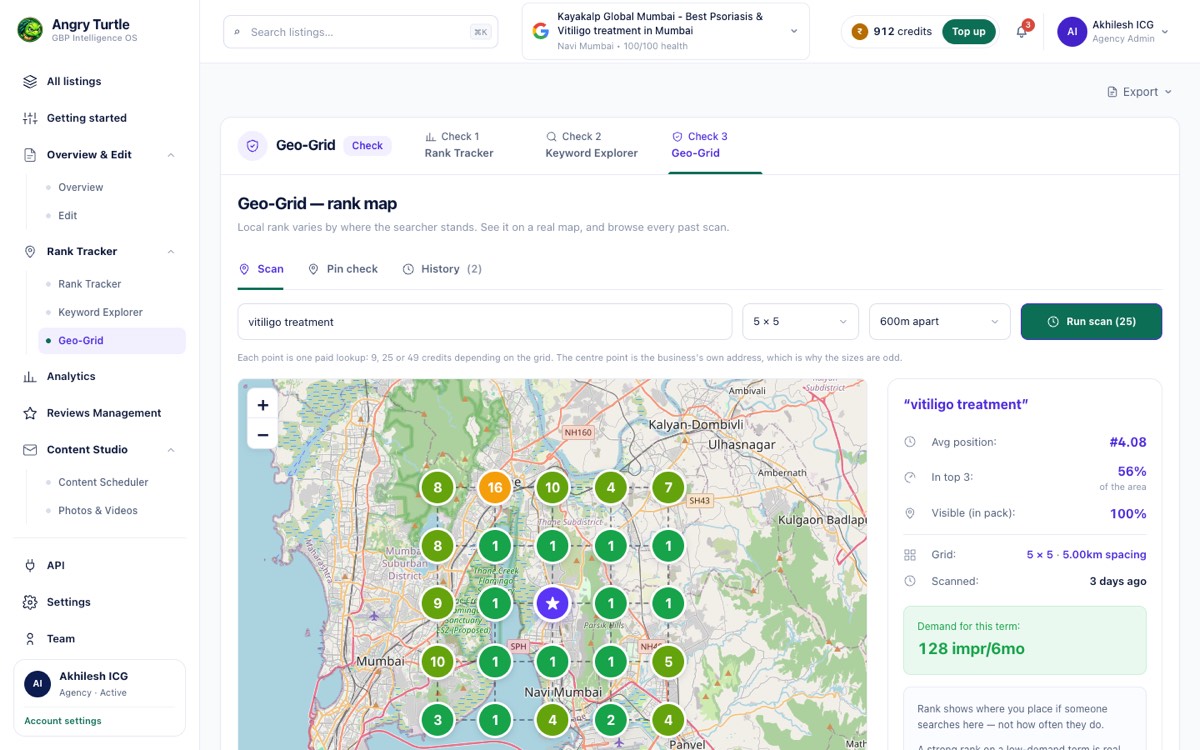
Geo-Grid Rank Maps — from the live Angryturtle console.
How Geo-Grid Rank Maps works.
Pick a keyword
Choose "dentist near me" or any query that matters to you.
Drop the grid
A grid of virtual searchers scans your whole service area.
Read the map
Green/amber/red cells show exactly where you rank — and where to push.
What's inside.
The building blocks that make this module work.
Who it's for.
Confirming you rank where your customers actually search from in Mumbai, Delhi or Bengaluru.
Showing clients ranking movement with a before/after grid.
Finding the localities where a small push wins you the top-3.
One rank number lies by averaging
A gym in HSR Layout, Bengaluru, checks its rank for "gym near me" from the owner's phone, sees position 2, and assumes the listing is in good shape everywhere. It isn't. Rank on Google Maps is resolved per searcher location, not per business, so the same gym can sit at position 2 for someone standing outside it and position 9 for someone three kilometres away in Koramangala who would otherwise have walked in. A single number collapses dozens of different realities into one figure that happens to be true only at the exact point it was measured from — proximity to the searcher is one of the strongest local ranking inputs Google uses, and a normal rank check hides it completely.
That's the actual problem a geo-grid solves, and it's a narrower problem than "am I ranking well," which is what most owners think they're asking. The real question is where the coverage falls apart, because that's the only version of the question with an actionable answer attached to it.
What a grid actually shows you
A geo-grid drops a set of virtual searchers across the service area and checks position at each point separately, then colours the result — green where the business wins, amber for mid-pack, red for buried. For most Indian metro service areas, the pattern that shows up isn't random. It's usually a fairly clean gradient outward from the pin, with a harder cliff wherever a strong competitor sits, and pockets of red in residential clusters the business has never actually served a customer from, which is often the first sign that a category or service-area edit could open new territory rather than just defending existing ground.
A healthy grid for an established local business looks like mostly green near the pin, fading gradually to amber further out, with red confined to areas genuinely closer to a strong competitor's own pin. An unhealthy grid looks different — hard red starting within a few hundred metres of the business's own address, which usually isn't a distance problem at all. That pattern almost always traces back to something on the profile itself: a weak or missing local pack presence caused by an incomplete category list, thin reviews, or a listing that's barely been touched in months, not anything about the map.
The mistake to avoid is chasing full-grid green. Some red is structural — a competitor two doors down will always win the cells immediately around their own pin — and no amount of profile work changes that. What's worth acting on is red that shouldn't be there: a cluster of weak cells in a direction with real search demand and no obvious competitor advantage, which usually points to something fixable, like a missing secondary category or a description that never mentions the neighbourhood by name.
The Pin Checker and the Keyword Explorer, used together
The grid tells you where. The Pin Checker answers a narrower version of the same question — rank at one exact lat/long or pincode, useful when a client asks "but what about my actual clinic in Indiranagar," not the average across the whole city. It's the tool for settling a specific dispute, not for exploring the map.
The Keyword Explorer works upstream of both. It's easy to build a grid for "gym near me" and stop there, missing that "24 hour gym Bengaluru" or "women's only gym HSR" carry real, separately trackable near-me search demand with a completely different competitive picture. Suggested keywords get pulled from first-party data and sized against Google Ads Keyword Planner, so the gym can add a keyword to the Rank Tracker in one click and only then decide whether it's worth building a grid for.
Working through it — the Bengaluru gym
The owner runs a grid for "gym near me" centred on HSR Layout with a five-kilometre radius. The map comes back mostly green within about 1.5 kilometres, fading to amber, then a solid band of red starting around Koramangala — not because of distance alone, but because two well-reviewed competitors sit directly in that band. Separately, a grid for "women's only gym HSR" comes back almost entirely green across the same radius, because none of the three visible competitors carry that category at all.
The decision that falls out of this isn't "spend money to beat the Koramangala gyms on their own turf" — that's an expensive fight against entrenched review counts. It's to lean into the second grid: add "women's only" as an explicit category and service line, since the map already shows there's almost no competition for it in the exact area the business already covers well.
A second, unrelated decision shows up six months later when the same chain is scouting a third location. Running a grid centred on a shortlisted site in Whitefield before signing the lease shows where an existing competitor already dominates versus where a new outlet would actually have daylight to build visibility from day one — a cheaper way to test a location hypothesis than opening the doors first and finding out from the calls that never come.
Where geo-grid does not help
It only measures Google Maps and local search rank — it says nothing about organic website rankings, which sit outside what Angryturtle does entirely. It's also not real time. A grid reflects the position at the moment it was pulled, and rank at any given cell can shift with time of day, device, and Google's own algorithm updates that no tool has visibility into in advance. And a grid can't diagnose why a cell is red on its own; it shows the symptom, not always the cause, which is why it's meant to be read alongside the rest of a profile's diagnostics rather than in isolation.
How it connects to the rest of the platform
Geo-grid results feed judgment more than they feed a score directly — Rank OS doesn't have a geography-weighted dimension of its own, but a weak Relevance or Review Health score usually explains why certain cells are red once you cross-reference the two. Competitive gaps that show up as a red band, like the Koramangala cluster above, are worth checking against Competitor Intelligence to see whether it's a citation gap, a review-volume gap, or both, and whether the profile's AI-answer readiness is lagging in the same direction, since AI systems increasingly draw on the same proximity and relevance signals when deciding which local business to surface. And once a fix is identified — a new category, an expanded service area — it gets made through the same platform rather than a separate tool, which is part of why agencies managing several locations tend to run geo-grid and Insights & Performance side by side: one shows where demand is being missed, the other shows whether a fix actually converted into more calls and direction requests afterward. The broader shift toward measuring visibility this way, rather than by a single rank number, is covered in how to measure AI search visibility.
For businesses just starting to think about coverage systematically, the difference between a single rank check and a full grid is explained in more depth on pricing and across the retail-sector notes on /industries/retail, where multi-outlet coverage gaps come up constantly. Review response patterns from AI-drafted replies tend to move the same red cells over time, since review activity is one of the levers a grid can't isolate on its own.
Geo-Grid Rank Maps — questions, answered
The rest of the platform.
Rank OS Scoring
One transparent 0–100 score, split into the 5 weighted levers that move the map pack — with the top 3 fixes ranked by expected point lift.
Explore Rank OS ScoringAI Reviews + Virtual CMO
On-brand, one-click AI replies to every review — plus a Virtual CMO grounded in your own data, and a Brand Identity-vs-Image gap read that shows how customers really perceive you.
Explore AI Reviews + Virtual CMONAP & Citation Intelligence
A live directory-presence matrix of every listing that has your business wrong — with duplicate detection, missing-citation gaps and a prioritised fix list.
Explore NAP & Citation IntelligenceOne-Click Google Posting
Write once and publish an offer, event or update across all your listings on a schedule — a freshness signal that feeds your Rank OS score.
Explore One-Click Google PostingCompetitor Intelligence
A standardised view of your top-5 local rivals — ratings, review volume and the Us-vs-Competitor citation landscape — with the gaps you need to close.
Explore Competitor IntelligenceInsights & Performance
Real GBP metrics — views, calls, directions, clicks — split by branded vs discovery, over any date range.
Explore Insights & PerformanceDemand Clusters & Momentum
Industry-aware keyword clusters with a momentum read and demand sizing, built from your own GBP data.
Explore Demand Clusters & MomentumAsk Maps / AIO Readiness
A per-listing question bank and visibility checks that show if your profile is a citable AI answer.
Explore Ask Maps / AIO ReadinessEdit Location (Write-Back to Google)
A full GBP editor with a live "how it looks on Google" preview — every change pushes straight to Google.
Explore Edit Location (Write-Back to Google)Brand Identity vs Image
Your canonical brand story set against how reviews say customers really see you — plus the gap and the fix.
Explore Brand Identity vs ImageAgency OS
Multi-tenant, white-label local SEO with roles, metered credits, client portals and a full API.
Explore Agency OS